
HomeLab Topology
Physical Network Below is the physical network diagram of my homelab, followed by photographs of the actual setup. Logical Network Topology Below is the logical network topology of my homelab. The diagram will show the services i run and what network they are associated to. Allthough the network is somehow segmented some rules allow trafic between vlans.
Home Server
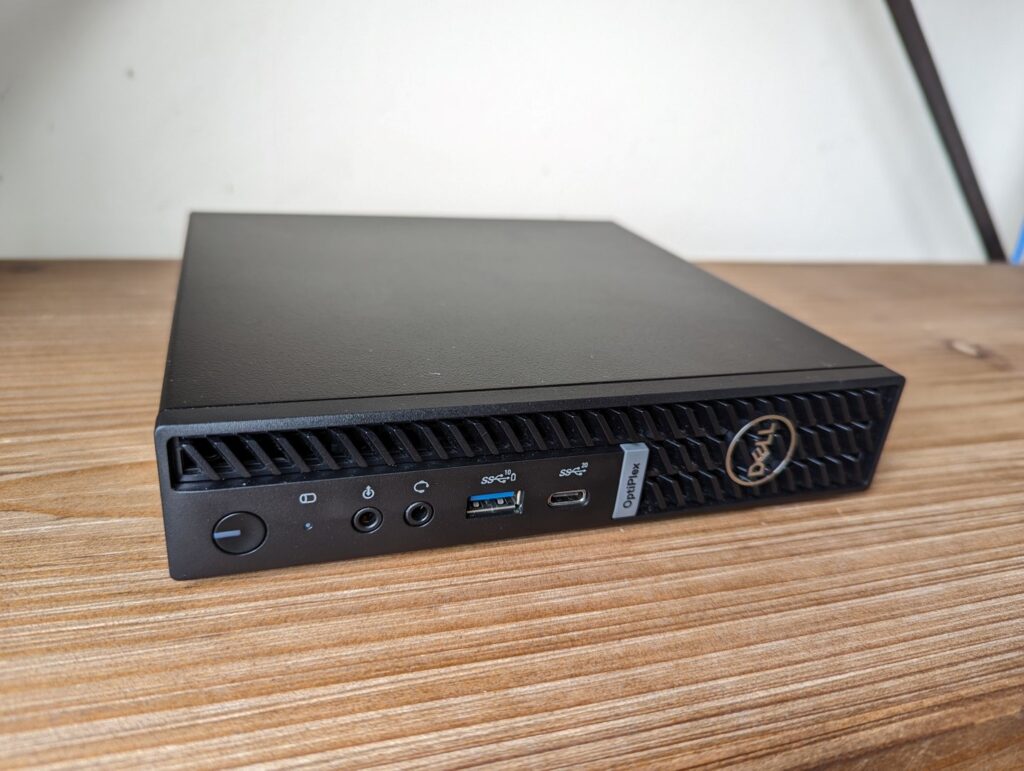
Hardware For my home server, I use a Dell OptiPlex Micro, which offers the perfect balance of compact size, power efficiency, and reliable performance. It’s well-suited for running multiple Linux services and containerized applications without drawing excessive power or taking up space. Hardware Specifications: CPU: Intel Core i5-8500T, 6 cores, base frequency 2.10GHz Memory: 16GB DDR4 @ 2333MHz Storage: 1TB NVMe SSD for fast and responsive storage Power Consumption: Typically 15–25W under load The biggest advantage of the OptiPlex Micro is its low power draw and 24/7 reliability. Consuming only as much electricity as a standard light bulb, it is both cost-effective and environmentally friendly to keep running continuously. Overall, this compact system provides excellent value as a home server platform: energy-efficient, quiet, and powerful enough to run a wide variety of services in a homelab environment. Hypervisor I use a hypervisor to make better use of my hardware and keep services isolated. Instead of running everything on one host, each service runs in its own VM, which makes the setup simpler, more scalable, and more stable. If one server has an issue, it doesn’t affect the others. For the software, I chose Proxmox VE, a free and well-supported Type 1 hypervisor. It combines KVM virtualization with LXC containers, offers an easy-to-use web interface, and includes advanced features like snapshots, backups, and clustering. Proxmox has strong community support and a solid development roadmap, making it reliable and future-proof for a home server environment. I use proxmox’s inbuild backup functianality and keep backups both locally and in Azure, this ensures i have a secure imuteable backup and a local backup which is fast to restore from. Ensuring that i can restore no matter what if i tend to get hacked in the future. As much as i would have loved having a backup solution with air gaped backups sadly i don’t, and its just to save on cost, becouse this is not a serious production company who falls under if somehow the imuteable backups isn’t enough. My Featured Servers / Applications Home Assistant Docker / Portainer Zabbix and Grafana Authentik Traefik I use Home Assistant as the central hub for managing my smart home. Through it, I control all my lights, temperature settings, and other connected devices. Beyond just home automation, I also integrate data from third-party servers and applications, making Home Assistant the central mangament system in my home and server envirement. My long-term goal is to make Home Assistant the only interface I need to check for both monitoring and managing applications, tools and programs I use in the daily. To make sure my Home Assistant runs smooth, I have several “backend applications” running in the background that handle infrastructure tasks such as authentication, reverse proxies, and networking. For stability and performance, I run Home Assistant using the official KVM virtual machine image. This ensures the best experience as its the most supported out of the box method to run Home Assistant. I run a dedicated server with Docker, hosting several containers for different applications and services. To simplify the management of these containers, I use Portainer as a user friendly interface on top of Docker. I really appreciate the flexibility of Docker because it offers a wide range of preconfigured, ready-to-deploy containers. This makes it possible to spin up new services quickly without the hassle of complex setup, while still maintaining good security practices and separation between applications. To enhance security and streamline access, my Portainer instance is integrated with Authentik as the Identity Provider (IdP), providing Single Sign-On (SSO) for authentication. This setup gives me both convenience and centralized control over access management across my services. I run Zabbix as my main monitoring solution, keeping track of all my servers, containers, and services. It provides real-time insights into performance, availability, and resource usage, while also sending out alerts and alarms whenever something goes wrong. This ensures I can respond quickly and keep everything running smoothly. To extend its capabilities, Zabbix is fully integrated with my Grafana server. While Zabbix handles the raw monitoring and alerting, Grafana takes that data and transforms it into custom dashboards that visualize every aspect of my infrastructure. From firewall activity to performance metrics across my Linux servers and Docker containers. Both Zabbix and Grafana are configured to use Authentik as the Identity Provider (IdP) with Single Sign-On (SSO). This keeps authentication consistent, secure, and centralized across my monitoring and visualization stack. At the core of my infrastructure, I run an Authentik server that acts as the central Identity Provider (IdP) for my entire environment. My goal is to have all applications whether its front-facing tools like Home Assistant and Grafana or backend management systems like Portainer and Zabbix integrated with Authentik for authentication. By unifying authentication under Authentik, I enable Single Sign-On (SSO) across my home server ecosystem. This approach not only streamlines access by reducing the need for multiple logins, but it also greatly improves security and manageability. With one consistent identity provider, I can enforce stronger policies, centralize user management, and have a clear overview of who can access what. Ultimately, Authentik provides the backbone for a more cohesive, secure, and user-friendly environment, tying all my services together under a strong an secure authetication layer I use Traefik in my home server environment as my reversed proxy, this is because it provides a flexible and powerful way to manage access to all of my services. One of the key benefits is its seamless integration with Cloudflare, which allows me to automatically obtain a wildcard SSL certificates. This means I can securely serve all of my home services over HTTPS without needing to manually manage individual certificates for each service. Traefik supports both statically configured reverse proxies and dynamic configurations, which makes it incredibly versatile. For services that are always running, I can define static routes in the configuration, ensuring they are reliably accessible. At the same time, Traefik’s built-in dynamic reverse proxy functionality allows it to automatically detect and expose